.png)


.png)
Summary
- Call scoring transforms sales coaching from subjective guesswork to a data-driven process by analyzing key metrics like talk-to-listen ratios (ideally 40:60) and adherence to sales methodology.
- To implement this, record your Google Meet calls and integrate an AI-powered tool to automatically analyze conversations against custom scorecards.
- This data-driven approach leads to more consistent team performance, faster rep improvement, and frees up manager time by automating call reviews.
- AI sales coaching platforms like Hyperbound's AI Real Call Scoring can automate this entire process, providing objective feedback and actionable insights on every Google Meet call.
Ever finish a Google Meet sales call and immediately feel like you've forgotten 30% of what was discussed? Or do you struggle with organizing all your post-call notes and follow-ups? You're not alone. Sales professionals everywhere are searching for that "little assistant to take notes and remind me of details" while managing their busy schedules.
The good news? With the rise of powerful AI tools that integrate seamlessly with Google Meet, implementing a sophisticated call scoring system is no longer reserved for enterprise teams with massive budgets. It's now accessible to sales teams of all sizes.
This guide will walk you through exactly how to add call scoring to your Google Meet sales calls, covering the essential metrics, the right tools, and best practices to transform your sales coaching and drive consistent performance.
What is Sales Call Scoring (And Why It's a Game-Changer)
Call scoring is the process of rating sales representatives' performance on calls using qualitative and quantitative metrics relevant to your sales process. It transforms subjective feedback into structured, data-driven insights.
Breaking Down the Score: Qualitative vs. Quantitative Metrics
Qualitative Scoring focuses on the how of the conversation. This includes assessing the quality of the interaction, such as how well reps build rapport, demonstrate active listening, and manage the conversation flow.
Quantitative Scoring focuses on data-driven, measurable aspects of the call. This includes metrics like talk time distribution, the speed of responses to questions, and the number of interruptions.
The "Why": Key Benefits of Implementing Call Scoring
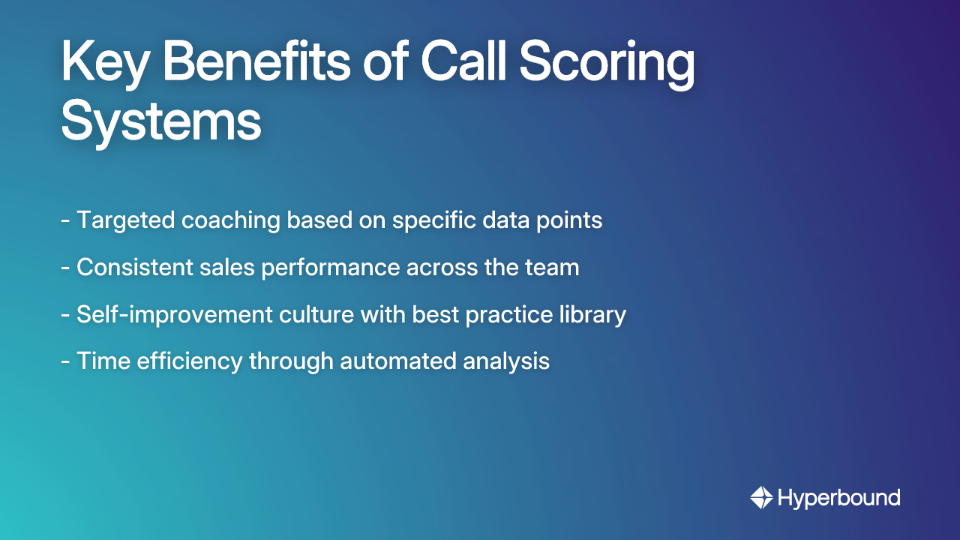
- Targeted, Effective Coaching: Move beyond generic advice. With data, you can pinpoint specific areas for improvement, like questioning skills or objection handling. This leads to more efficient and impactful coaching by automating manual reviews and focusing on specific, data-backed improvement areas.
- Boost Sales Performance and Consistency: Early identification of weaknesses prevents underperformance. AI-driven insights help ensure every representative adheres to your winning playbook, driving more consistent deal execution.
- Foster a Culture of Learning and Self-Improvement: High-scoring calls become a library of best practices for the entire team. This empowers reps to engage in self-coaching and peer-to-peer learning. Sales reps can use AI to "Analyze this transcript. What did I do well? Where can I improve?" - essentially having an on-demand sales coach.
- Increase Visibility and Time Efficiency: Gain clear insight into which coaching strategies and sales methodologies are working. Automated summaries and analysis free up managers from having to listen to every single call recording.
The Anatomy of a Winning Sales Call: Key Scoring Metrics
To score calls effectively, you need a robust scorecard. Here are the critical metrics to track:
.png)
Talk-to-Listen Ratio
The ideal ratio is often cited as 40% salesperson talk and 60% customer talk. A high salesperson talk time might indicate a one-sided monologue rather than an engaged conversation.
Active Listening Indicators
Did the salesperson repeat customer concerns or acknowledge their statements? This demonstrates understanding and builds trust.
Questioning Skills
The type and frequency of questions matter. The focus should be on asking open-ended questions that encourage the client to share detailed information.
Sentiment and Tone Analysis
This is crucial. As one sales professional aptly noted, "If you're only doing analysis on the transcript, you're going to have an inaccurate call sentiment." Modern tools use AI to analyze vocal patterns and word choice to detect emotional cues like enthusiasm or frustration, providing a much deeper level of insight.
Adherence to Sales Methodology
Score how well the representative follows established frameworks like BANT or MEDDPICC, ensuring a structured and effective approach to qualification.
Key Skill Evaluation
Assess performance on critical sales behaviors like discovery depth, objection handling, and empathy.
How to Implement Call Scoring for Google Meet: A Step-by-Step Guide
Step 1: Record Your Google Meet Calls
The foundation of any call scoring program is the recording. Google Meet has built-in recording capabilities. Ensure you have the proper permissions and inform participants that the call is being recorded for quality and training purposes.
Step 2: Choose and Integrate an AI Call Scoring Tool
While manual scoring is possible, it's subjective and time-consuming. The modern approach is to use an AI-powered conversation intelligence platform that integrates directly with your Google Workspace.
Tool Examples:
- Hyperbound: An advanced AI sales coaching platform that integrates with your tech stack to analyze sales calls. Its AI Real Call Scoring provides unbiased, data-driven feedback on both live calls and recordings against your custom methodology, highlighting areas for improvement and scaling effective coaching.
- Rafiki.ai: This tool integrates with Google Meet, Calendar, and Gmail. It provides automated recording and transcription, smart call scoring to identify coaching needs, and AI-generated summaries.
- Outdoo.ai: Offers AI-powered scoring that integrates with Google Meet to provide objective evaluations and actionable feedback on every call. Its dashboards allow you to track skill gaps and link performance to pipeline results.

Step 3: Customize Your Scorecards and Keywords
Once a tool is integrated, define what success looks like.
- Build Scorecards: Create different scorecards for different types of calls (e.g., a cold call scorecard will have different criteria than a final demo call scorecard).
- Set Up Trackers: Configure the AI to listen for specific keywords, such as competitor names, mentions of budget, key pain points, or feature requests. This helps automate analysis and addresses the need for "analytics on most common complaints."
Step 4: Analyze the Results and Coach Your Team
After each call, the AI platform will automatically generate a completed scorecard, a full transcription, and an AI Summary.
Use the performance dashboards to review trends across the team. Are multiple reps struggling with objection handling? Is the talk-to-listen ratio consistently off?
Use these data points to facilitate coaching sessions that are objective, evidence-based, and focused on specific, improvable behaviors.
Best Practices and Overcoming Common Hurdles
Getting Client Buy-In for Recording
Many sales professionals report that "customers don't want to be recorded" or that clients might feel "super sketched by it."
Best Practice: Be transparent. A simple and effective approach recommended by sales professionals is to frame it as a benefit to the client: "I'm going to record this call so I don't miss any details and can send you a summary of our discussion afterward. Is that alright with you?" This turns it from a compliance check into a value-add.
Addressing Employee Concerns (The 'Big Brother' Effect)
Some team members may worry that "AI is going to monitor our conversation voice tones... you have to have a Ned Flanders tone of voice... to get a good grade."
Best Practice: Frame call scoring as a developmental tool, not a punitive one. The goal is not micromanagement but empowerment. Focus on objective evaluations of the call's content and structure, not personal criticism.
Fostering a Culture of Continuous Improvement
- Encourage Self-Evaluation: Have reps score their own calls to foster ownership and critical thinking about their performance.
- Deliver Timely Feedback: Insights are most effective when delivered soon after a call, while the details are still fresh.
- Use Gamification: Leaderboards and friendly competitions can motivate reps and celebrate success.
Conclusion: From Guesswork to Growth on Google Meet
Call scoring on Google Meet is no longer a complex, manual process. By integrating AI-powered tools, you can systematically analyze every sales call, uncover powerful insights, and provide your team with the targeted coaching they need to succeed.
You'll move from subjective feedback to data-driven coaching, improve sales consistency, and build a culture where every call is a learning opportunity.
Ready to stop letting valuable insights slip through the cracks? Explore how Hyperbound's AI-powered platform can transform your sales process. Book a demo to see firsthand how automated call scoring and AI coaching can integrate with your Google Meet workflow and elevate your team's performance.
Frequently Asked Questions
What is sales call scoring?
Sales call scoring is the process of evaluating a sales representative's performance on a call using a set of predefined qualitative and quantitative metrics. It provides structured, data-driven feedback to identify areas for improvement and ensure consistency across the sales team.
Why should my sales team use call scoring?
Your sales team should use call scoring to drive significant improvements in performance and consistency. The key benefits include providing targeted, data-backed coaching, identifying and correcting weaknesses early, fostering a culture of self-improvement by creating a library of best practices, and increasing time efficiency for managers through automation.
How do I implement call scoring for Google Meet?
To implement call scoring for Google Meet, you should follow four main steps. First, ensure you are recording your calls. Second, choose an AI-powered conversation intelligence tool that integrates with Google Meet. Third, customize your scorecards and set up trackers for key topics. Finally, analyze the automated results to provide targeted coaching to your team.
What metrics should I include in a sales call scorecard?
A robust sales call scorecard should include a mix of metrics to provide a complete picture of performance. Key metrics include the talk-to-listen ratio (ideally 40:60), active listening indicators, the quality of questioning (open-ended vs. closed), sentiment and tone analysis, adherence to your specific sales methodology (like BANT or MEDDPICC), and evaluation of core skills like objection handling.
How can I convince my clients to let me record our calls?
You can convince clients to allow call recording by framing it as a benefit to them. Instead of simply asking for permission, explain the purpose positively. For example, say: "I'm going to record this call so I don't miss any important details and can send you a complete summary afterward. Is that okay?" This approach positions the recording as a value-add that ensures accuracy and thorough follow-up.
Can AI really score a sales call accurately?
Yes, modern AI tools can score sales calls with a high degree of accuracy by analyzing multiple data points beyond just keywords. These platforms evaluate talk-to-listen ratios, sentiment and tone through vocal patterns, adherence to sales methodologies, and other key behaviors. This provides an objective, consistent, and data-driven evaluation that minimizes the human bias often present in manual scoring.
Book a demo with Hyperbound


